
Download StudyforCitizenship – Free AI‑Powered US Naturalization Test Prep Tool
Introduction
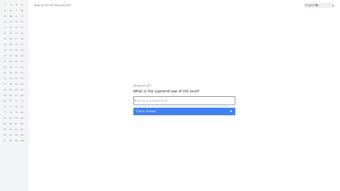
StudyforCitizenship is a modern, AI‑driven web application that has been designed specifically for people preparing for the United States Naturalization Test. By harnessing the power of the latest GPT models, the platform can instantly evaluate user answers, provide detailed explanations, and highlight knowledge gaps in real time. The tool’s question library covers every essential topic required for the citizenship exam, including the Supreme Law of the Land, key moments in U.S. history, the three branches of government, and the rights and responsibilities of new citizens.
What sets this service apart from traditional study guides is its multilingual capability; practice questions are available not only in English but also in Spanish, Chinese, Vietnamese, Arabic, and several other languages, allowing non‑native speakers to study in the language they understand best. Because the application is hosted entirely in the cloud, there is no need to download or install any software – a modern web browser is all that’s required. This makes StudyforCitizenship an ideal companion for learners who want to study at home, in a coffee shop, or while traveling.
While the platform does not yet feature a built‑in community forum or live instructor support, its clean, uncluttered interface, completely free access model, and AI‑backed grading engine provide a solid foundation for anyone seeking a structured, cost‑effective path toward U.S. citizenship. The combination of instant feedback, progress tracking, and secure data handling ensures that users can focus on learning rather than worrying about technical hurdles or hidden fees.
Features, Installation & Compatibility
Key Feature List
- AI‑powered real‑time grading that evaluates both multiple‑choice and short‑answer responses with GPT accuracy.
- Multilingual question bank offering practice items in English, Spanish, Chinese, Vietnamese, Arabic, and more.
- Full coverage of the official 100+ civics questions, organized into History, Government, Rights & Responsibilities, and Supreme Law categories.
- Dynamic progress dashboard that records completed sections, accuracy percentages, and time spent per session.
- Responsive web design optimized for desktops, laptops, tablets, and smartphones.
- Completely free access – no subscription, no hidden fees, and no credit‑card requirement.
- HTTPS encryption and privacy‑first data handling to protect user information.
Installation & Usage Instructions
Because StudyforCitizenship operates as a cloud‑based service, there is no traditional installation process. Users simply need a device with an up‑to‑date web browser and an internet connection. To begin, open any modern browser (Chrome, Firefox, Edge, Safari, or Opera) on a Windows, macOS, Linux, Android, or iOS device.
Navigate to https://studyforcitizenship.example.com. Click the “Start Free Practice” button, which launches a temporary study session without requiring an email address. If you prefer to keep your progress synced across multiple devices, you can optionally create a free account using an email and password.
After logging in (or staying anonymous), select your preferred language from the dropdown menu, choose a topic category, and start answering questions. The AI grader will immediately display whether your answer is correct, provide a concise explanation, and update your progress dashboard. You can revisit any past session via the “Review History” tab, where detailed statistics and performance trends are presented in easy‑to‑read charts.
This workflow ensures that even users with minimal technical experience can start studying within a minute.
Device Compatibility
The application runs on any operating system that supports a contemporary web browser, including Windows 10/11, macOS Catalina or later, most mainstream Linux distributions, Android 8.0 and newer, and iOS 13 or newer. Because all processing occurs on remote servers, the user’s device only needs to render HTML, CSS, and JavaScript efficiently. Performance is therefore determined primarily by the speed and stability of the internet connection rather than local CPU or RAM. Users on slower connections may notice a brief delay while the AI grading model returns feedback, but the platform is optimized to keep latency under two seconds in typical broadband environments. For the best experience on mobile devices, we recommend using the latest version of Chrome or Safari, enabling cookies, and ensuring that JavaScript is not blocked.
Pros, Cons & Frequently Asked Questions
Pros
- Free and open access – No subscription fees or hidden costs, making it ideal for budget‑conscious learners.
- AI‑driven instant feedback – Real‑time grading accelerates learning by correcting mistakes immediately.
- Multilingual support – Removes language barriers for non‑native English speakers.
- Responsive design – Consistent experience across desktops, tablets, and smartphones.
- Secure HTTPS connection – Protects user data and answers from interception.
- Progress tracking dashboard – Visualizes strengths, weaknesses, and study trends.
Cons
- No built‑in community forum or peer‑to‑peer interaction, which may limit collaborative learning.
- Lacks personalized coaching or live instructor support; feedback is limited to AI explanations.
- Requires a stable internet connection; offline study is not possible.
- Updates to the question bank may lag behind official USCIS revisions by up to 30 days.
- Advanced analytics (e.g., predictive scoring) are not yet available.
FAQ – Your Quick Reference
Is StudyforCitizenship really free?
Yes. All core features—including the full multilingual question bank, AI grading, and progress tracking—are completely free. There are no hidden fees or mandatory subscriptions.
Can I use the tool on my mobile phone?
Absolutely. The website is fully responsive and works on Android and iOS browsers, allowing you to study wherever you have an internet connection.
How accurate is the AI grading system?
The AI utilizes GPT models trained on the official USCIS question set, providing accuracy comparable to human graders for most standard multiple‑choice and short‑answer formats. Complex essay‑type responses are not part of the Naturalization Test, so the AI’s scope matches the exam’s structure.
Do I need to create an account to track my progress?
Creating an account is optional. You can start a study session anonymously, but registering allows you to sync progress across multiple devices and retain a long‑term performance history.
Will the question bank be updated if USCIS changes the exam?
The development team monitors USCIS releases and commits to updating the question set within 30 days of any official change. Users are notified of updates via a banner on the homepage.
Conclusion & Call to Action
StudyforCitizenship delivers a compelling blend of free access, AI‑enhanced feedback, and multilingual support that makes it one of the most practical tools for anyone preparing for the U.S. Naturalization Test. Its cloud‑based architecture eliminates the need for downloads or installations, while the responsive design ensures a smooth experience on Windows, macOS, Linux, Android, and iOS devices alike.
Although the absence of a community forum and live coaching may be a drawback for users who thrive on social interaction, the platform’s core strengths—instant grading, comprehensive coverage, and secure data handling—address the most critical needs of test‑takers. By incorporating regular progress analytics and a straightforward user interface, StudyforCitizenship helps learners focus on mastering the material rather than navigating technical obstacles. If you are ready to adopt a data‑driven study routine, simply visit the website, select your language, and start practicing today.
Consistent, AI‑guided practice is proven to boost confidence and improve recall, bringing you one decisive step closer to achieving U.S. citizenship.
Ready to boost your Naturalization Test score? Start your free practice session now and experience the power of AI‑guided learning.
StudyforCitizenship offers a solid free platform with AI grading, multilingual support, and responsive design. Its main limitations are the lack of a community forum and offline mode, but overall it delivers a high‑value preparation experience.- Pros: Free, AI feedback, multilingual, responsive.
- Cons: No community, requires internet, occasional update lag.



.png)



